Dev Update: Week 42 and 43 of 2026
October 25, 2026
In the last two weeks, Drawpile 2.3.1 has been released and work on the next version has commenced, with the liquify tool already available.
If you want to test the latter, it’s in the alpha release.
2.3.1 Release
The 2.3.1 release is out, the news announcement is at https://drawpile.net/news/release-2.3.1/.
This also includes some new brushes in the Drawpile tag as well as a new “Secret’s Brushes” tag with several cool brushes provided by Blozzom. These include halftones, stars, ribbon brushes and more.
Otherwise there’s not much to say about the release, everything seems to have gone well and be stable. Which is good, I like my updates boring and making the software better.
Triangle Angle
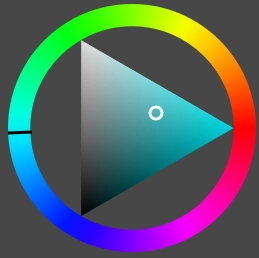
The fixed color wheel triangle now points in the direction it does in most other drawing programs as well. You can change the direction it’s pointing by toggling between descending and ascending direction. There’s currently no setting to change this to be any other way under the assumption that it’s not needed, but if it does turn out to be desired, then it can be made configurable further. The rectangle and the rotating triangle still work the same as they did before.
This was contributed by resttime on GitHub and Glax by adding the rotation to QtColorWidgets.
Liquify Tool
The liquify tool is now ready. In some other programs, this is also called “warp”. You activate it similarly to the transform tool, by selecting an area and then pressing the appropriate button in the tool options dock or the selection action bar. You can also press a shortcut, by default it’s Q. Or you can also switch to the liquify tool and start the process from there instead.
You can move things around, swirl them left and right, expand and shrink them and erase the liquification again. There’s also a smoothe option, which will get rid of harsh edges or pinches.
Unlike a previous attempt, I ended up not using Krita’s grid-based implementation after all. It instead works via a displacement map, which tells every pixel where it’s supposed to grab its contents from relative to its location. This is more accurate and much better to optimize than a complicated overlapping grid. The liquify tool is basically just a way to edit this displacement map via brush strokes.
When you apply the liquify operation, it will simply cut and paste the changed area. That makes it compatible with older versions of Drawpile and won’t make weaker devices run hot when faced with a big image to liquify.
This was suggested by too many people to list, some issues were found by Blozzom and Bonbli that are now fixed.
Minor Additions and Bugfixes
On Android, Lenovo Tab stylus buttons are now handled. They translate to pressing F26 to F30. This was built with support from Moody2357 on the Krita-Artists forum.
The latest update to the Wacom Movinkpad made a cursor appear while the stylus was hovering, which flickered out of existence every time you press it down. It has been worked around. This was reported by Sylvanticus on the Krita-Artists forum.
Resuming sessions on Android now properly shows a dialog that it is in progress and will correctly restore layer visibility. This was reported by tiar directly.
Playing back recordings from Drawpile 2.2 could fail with a serialization error because the stroke drawing commands got bigger to allow for the added layers and selection masking in Drawpile 2.3, pushing them beyond what fits into a single command. This is now fixed by just splitting those oversized commands in half. This was reported by Soul on Discord.