Dev Update: Week 37 and 38 of 2026
September 20, 2026
The last two weeks had the final stretches of things to go into 2.3.1-beta.2. The build process for that has started and it will probably be released this week.
The alpha release is already available with everything that will go into it.
Menu Button
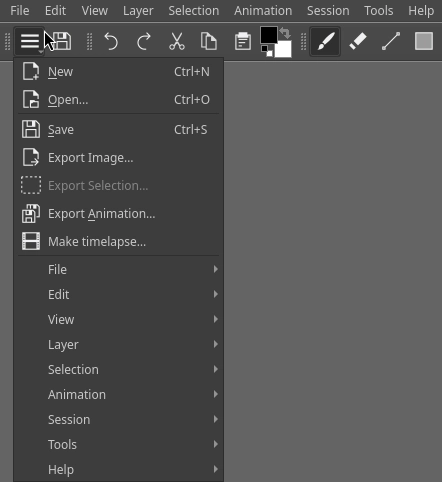
The “new” and “open” buttons in the file toolbar have now been replaced by a menu button that shows a set of common file options. You probably export files way more frequently than you create and open them, so I think it makes sense to put these on the same level. Creating and opening also involve more clicks afterwards, so I don’t think adding one more click to open this menu is an issue.
It also adds a duplicate of the entries in the menu bar here for convenience, since the top bar can be annoying to access on mobile devices where the bevel eats into them or the system menu bar pops over it and you have to wait for it to bugger off.
This idea came up through this Krita-Artists forum thread. Depending on its reception in Drawpile, it may also end up going into Krita, since it’s in pretty much the exact same situation.
Browser Additions
The web browser version of Drawpile now warns about closing your tab too quickly after saving. Some browsers, including Chrome and its derivates, will actually empty the file you’re saving to as the first step and then start downloading to a temporary file. If you close the tab while the download is in progress, you’ll be left with the empty file. It’s pretty stupid behavior, but I don’t think there’s much Drawpile can do about it other than warning about it.
The start page in the browser now gives you a checkbox that lets you enable the low-pressure stylus curve explicitly. The pressure tester will also now tell you how high your pressure was and tell you if you should toggle the checkbox.
The dependencies that try to detect the device and browser have also been updated, so hopefully the detection of such low-pressure styluses will work a bit better again.
Work In Progress Liquify
There’s still plenty of work to do on this, but the basics of a liquify tool are now working in Drawpile. It uses the same logic from Krita, which has recently gotten a lot faster thanks to work from tiar. This will definitely not be in 2.3.1, since this is a pretty major addition. But presumably it will be available in development builds shortly afterwards.
The way this works over the network is that it just cuts and pastes the image, just like other “heavy” transforms at very large sizes do. That means it doesn’t cause compatibility issues or slows down other people excessively.
Crop Tool Thoughts
There hasn’t been any work on this, but I’ve been thinking a bit on how a crop tool would work in Drawpile. In other programs, the crop tool just lets you demarcate a rectangular area and then resizes the canvas to that area, but obviously for Drawpile that isn’t spectacularly useful, most of the time you want to export the cropped area or something.
However, thinking a bit about it, it seems like the “make a rectangle” feature is actually the real purpose of the tool. It’s like a rectangle selection, but you can adjust it more finely. So I’m considering implementing the tool that way and then giving you the choice of what to do: create a selection, export the area, create a selection and maybe other stuff like copying it. And of course resizing the canvas, which would probably open the resize canvas dialog as a last chance confirmation before you potentially cut out other people’s stuff.
Minor Additions and Bugfixes
The project editing talked about in the previous blog posts is now done and available through File → Merge/split projects.
Timelapses can now be switched to be speed-based instead of duration-based. It will play back the drawing at that relative speed, skipping pauses. This was suggested by xxxx.
The timelapse dialog now lets you drag the logo around instead of having to fiddle with the padding sliders manually. The preview at the top also now stays in place and its size can be adjusted by dragging a splitter around.
When a less than 3 days remain on a server ban, the ban message will now tell you how much time remains on it. Previously it would just give you a date, which was kind of confusing because of time zones and such. This was suggested by Bluestrings.
Saving an ORA file with clipping groups no longer messes up the frame assignments. This was reported by BluesFlying on Discord.
The workaround for getting disconnected on the first attempt of joining a session and then it would work upon reconnecting is now applied on all systems. Previously it was only on Android, but apparently some desktop systems also have this problem. This was reported by greendyno on Discord.
The default eraser brush has been changed to Paint 1, a build-up brush. The wash mode of the previous Paint 2 default tended to cause despair on low-pressure styluses with people scrubbing over the same area repeatedly and never managing to actually erase it fully because they didn’t lift their stylus.