Dev Update: Week 33 and 34 of 2026
August 24, 2026
The last two weeks have had some more work on the recording playback side and the previously announced work on Android compatibility. There is also work in progress to store the state of the view in project files to be able to play that back and resume it.
Recording Conversion
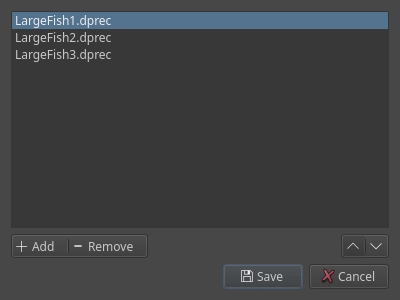
You can now convert the dprec and dptxt files to the dppr format via File → Import → Convert Recordings to Project. This will give you a dialog where you can add multiple recordings, arrange them in the correct order and produce a single project file from them. You can use that to then make a timelapse as normal, although since these recordings don’t contain timing information, the speed of your strokes may vary depending on the brush you used, as they do when using the drawpile-timelapse command-line tool.
The plan is to also let you add dppr files in this dialog so that you can combine and split those as well. Those get a bit more complicated though, since they may contain multiple sessions.
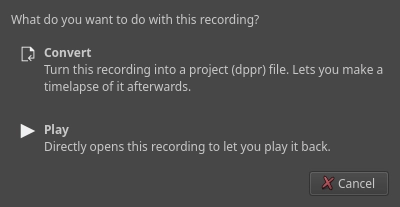
When you open a dprec or dptxt file, you will now be prompted for what you want to do with the file: convert it or play it back. The former will open the conversion dialog above, the latter the playback dialog.
There was some restructuring in the code here as well, making it so that dprec and dptxt files should now get recognized properly even if they have the wrong file extension. This was particularly noticeable on Android, where file “paths” sometimes get mangled in a way that leaves no recognizable extension on them.
Android 16
Drawpile has now been updated to work with Android 16 (SDK version 36) without the application disappearing underneath the system bars or camera notch. It should still continue to work on older versions on Android since it doesn’t need any of the new features, this update is just mandated by Google or else they will block installation of the application.
The same work has also gone into Krita. The build infrastructure there is still in the process of being updated, but it should land soon. Drawpile’s F-Droid build still has to be updated in this regard, but that’ll be done once the next beta release comes out and should only involve bumping some numbers.
Work In Progress View Area
Some work is ongoing to let dppr files save the state of the view, i.e. the position, zoom, rotation, mirror and flip, as you are drawing. Currently, saving and restoring the view already works, the playback dialog is able to make use of this and when a drawing gets resumed on Android, it will now also resume to the same view you had before instead of reverting to show the entire canvas.
This may also make its way into the timelapse feature, but with some additional processing to prevent the view from chaotically jittering around. There has been some work by Ciubix on Krita, which gives some really good-looking results. For Drawpile’s timelapses, the idea would be to limit the amount of movement in a certain time by combining view changes that happen in quick succession, as well as animating the transition between them. The exact algorithm for this is something to still figure out though.
Minor Additions and Bugfixes
When using the timeline’s “select” tool, dragging across a track with onion skins enabled now works properly. Previously, the start of the range would constantly get reset to the current frame, meaning you couldn’t select or deselect multiple frames by dragging across them.
16K page alignment on Android should now work properly, previously it didn’t get applied to the entire package. I’m not sure if this ever broke anything, but I think there may be some devices that need this.