Dev Update: Week 26 and 27 of 2026
July 6, 2026
The last two weeks were pretty busy for me outside of Drawpile, but there’s still been some fixes, additions and planning.
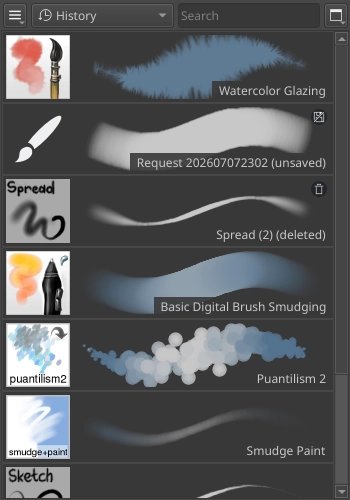
Brush History
The brushes dock now has a new “history” tag. It keeps a history of the brushes that you used, from most to least recent. It is meant to let you go back to previous brushes, like in other programs. It doesn’t keep a history of every single change you made to your brushes along the way.
When you delete a brush, it is now still available to be undeleted from the history. The same goes for brushes you request from other users, they now get added to the history as “unsaved” brushes. You can’t change the tag assignment or overwrite those brushes while they are deleted or unsaved, you have to undelete or save them first to do so. Removing those brushes from the history deletes them permanently, you will get appropriate warnings about this.
You can also clear the entire history at once from the drop-down and context menus while the history tag is selected. The confirmation dialog will tell you how many brushes you’re about to lose permanently if there are any deleted or unsaved ones.
Work In Progress Project Playback
Some work has gone into implementing playback for project (dppr) files. This is still a work in progress with not much to show for it yet, but there’s been some considerations about how it’s going to work and be architected.
I’ve went back and forth on whether the playback dialog should play things back in a separate window or on the canvas itself, like the current playback dialog does. The former would make some things easier by not having to change the entire reality of your main window into “playback mode”, but it has too many downsides with regards to functionality. It would require implementing half the main window to make it usable, so I’ve ended up deciding against it.
The current playback dialog is pretty old and hasn’t gotten much love in a long time. It will probably just go away and be replaced with the new one, Drawpile can just convert dprec into dppr files when you open them. This allows getting rid of a large amount of code that only exists for the sake of playback, in particular the “index” files that let you jump around in recordings have a large amount of code that makes no sense to continue maintaining, nor does the “companion file” approach work properly on Android, the browser or in Flatpak on Linux. The dppr format on the other hand uses snapshots of the canvas for autorecovery and saving in general already, so the playback can just make use of that.
The functionality of the playback dialog will probably stay largely the same: playing, pausing, stepping forward, stepping backward, changing playback speed and giving you a slider to go to specific points in the recording. The backward stepping ideally shouldn’t be limited to the presence of an index anymore, it’s better to let you jump to points in the recording very slowly than making you rewind all the way and go to the desired spot by manual playback. It would probably make sense to automatically create an index during playback, maybe while showing you the current size of the file and giving you the option to disable the indexing.
What would also be nice is to let you bring back the concept of “markers” that the dprec format previously had. Those didn’t do anything except stop the playback when they happened and I don’t think anybody really used them, given that I have not heard anyone ever mentioning anything about their removal several years ago. With the new timelapse functionality though, you could use these markers to define start and end points as well as crop areas. This would let you sensibly make timelapses of only a part of a session while accounting for multiple drawings being put in the same spot and/or getting moved around along the way, without turning the timelapse dialog itself into a bootleg video editor. The playback dialog can give you a “make timelapse” button of course.
Not sure whether the video export in the playback dialog itself will continue to exist, currently tending toward “no”. It makes more sense to me to first edit the recording and then make a video of it than “doing it live” like the current playback dialog does and if you make a single mistake you have to start all over from the beginning. Separating it has no downsides for any use case I can think of.
Lastly, the missing functionality of letting you open multiple recordings probably won’t be in this dialog either. Instead there’ll probably be a separate way to combine multiple dppr files into a single one first. This is kind of necessary in other cases anyway, for example when you want to recombine a recovery file with a saved dppr file or other situations where you somehow end up with multiple dppr files that are really supposed to be one. So giving you a dedicated project recombiner makes more sense to me than trying to juggle playback across multiple input files. And of course the playback dialog could send you to this combiner feature, like it could for making timelapses.
Minor Additions and Bugfixes
The layer pick shortcut (Ctrl+Shift by default) now shows the name of the current layer on the cursor so that you don’t have to look back and forth between the layer list and the cursor to see what you’re selecting. As a side-effect, also lets you tell which layer you are on currently if you just hold the shortcut without clicking. This was suggested by Gabr.
The line and gradient tool now snap the angle relative to the view rotation when you hold the constrain shortcut key (Shift by default.) This was reported by Ben.
Drawpile will now properly restore the Untagged tag when you open a new window while having that tag last selected, rather than reverting to All.