Dev Update: Week 14 and 15 of 2026
April 13, 2026
The last two weeks had some more autorecovery work, some session hosting process improvements, some fixes and optimizations. Everything described here is available in the alpha release.
This might be everything that needs to be done before translations can be opened for a beta release, although I’ll wait another bit in case there is feedback or I can think of something else.
More Autorecovery
Some more touchups have been made to autorecovery to get it ready for release. It is also now enabled by default.
The autorecovery settings dialog can now be summoned even when autorecovery is not active and lets you manage autorecovery settings for the current session there. You can enable and disable the autorecovery as well as change the size limit. It also has a link to the autorecovery preferences (which in turn have a link back to the dialog.)


At the bottom-right corner of the status bar, there’s now indicator for the autorecovery status. It will show a backup symbol when active and a crossed-out symbol when not. You can click on this to open the autorecovery settings. Previously, this spot in the status bar had a lock indicator icon, but that had become pointless now that the locks are displayed as a message on the canvas instead.
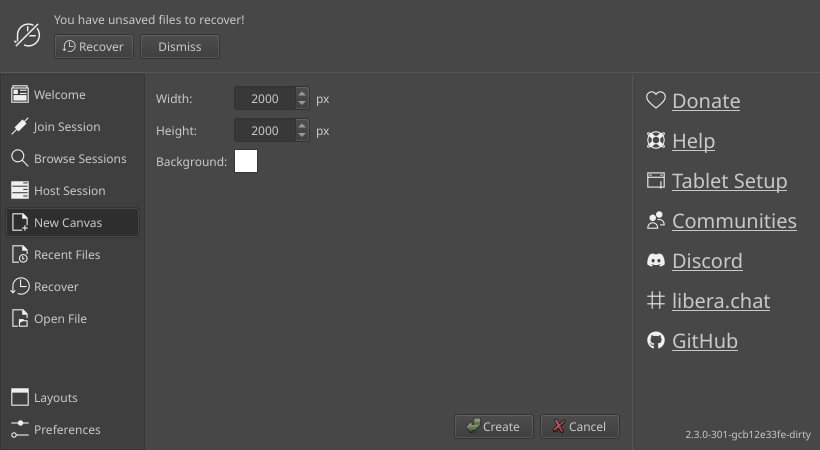
In the start dialog, there’s also now a message telling you if you have files to recover.
Synchronized Smudging Speedups
Synchronized smudging is a feature on brushes that will make the brush wait for its own stroke before it picks up colors from the canvas. It’s enabled by default for MyPaint brushes, since many of them rely on this being accurate or else they’ll produce artifacts. On the other hand, this is slower of course, because waiting takes more time than not waiting.
The main speedup has been to no longer send the strokes through the main thread, they are now sent directly from the stroke thread to the paint engine. This makes a huge difference on some devices where for some reason the main thread is slow at picking up the work. Well, relatively slow, it still takes less than a millisecond, but that adds up when the brush does a lot of smudging. On other devices that were fast to respond to begin with, you will probably not notice any difference.
When you make a stroke while another one is still going, that one is now cancelled after a moment. This stops strokes with really slow brushes from taking forever with no sensible way to cancel them and also fixes a hang that could happen if you switched brushes too quickly and started a non-synchronized stroke while a synchronized one was still going, which would get stuck forever waiting for each other.
The brush engine also now no longer pointlessly waits for the stroke if it didn’t change anything on the part of the layer that it wants to pick up colors from. This can happen with brushes that put down totally transparent or infinitesimally tiny dabs or brushes that have significant jitter. On brushes that just draw a line, every new dab will overlap with the last one, so this won’t make a difference for them, but those usually also do less color pickup to begin with.
Finally, MyPaint brushes that have an insignificant smudge factor set and don’t explicitly enable or disable synchronized smudging now default to having it disabled. It doesn’t make a visible difference anyway due to how little the smudging affects them, so I suspect that they have a smudge factor set at all is unintentional to begin with, whoever made the brush just didn’t fuss with the setting after they were happy with how it worked. A few of the default brushes in Drawpile are affected by this, as well as some in popular brush packs.
Passworded Session Improvements
While it has become pretty rare, it still happens occasionally that people will unintentionally host a public session when they mean to host a passworded one. This sometimes causes them to panic because strangers join their sessions and they end up kicking them or asking for server admin support. There’s been some changes to hopefully make that better.
The host dialog now always defaults to the passworded setting, even if you had it set to public last time. This is simply a safer option, it’s easy to forget that you had things set differently three weeks ago and not notice that you’re hosting a public session until you suddenly have strangers joining.
The text for the public and passworded sessions has also been changed. “Public, anyone can join” is now called “Public, strangers can join” instead, since people may have thought that they needed this option to let people without an account join or something. “Personal, only people you invite can join” is now just called “Only people you invite can join”, since the “personal” just adds a chance for misinterpreting what that means. There was some mulling about calling it “private” instead, but that would inevitably be confusing when you’re hosting on the public servers.
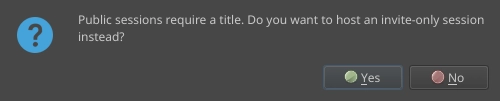
If you try to host a public session without setting a title, you now get asked whether you want to continue with a passworded session instead, rather than just giving a generic error. If you try to host a passworded session without a password, Drawpile will automatically generate one instead of balking that you didn’t specify one. These are basically just shortcuts, rather than making you do this stuff manually.
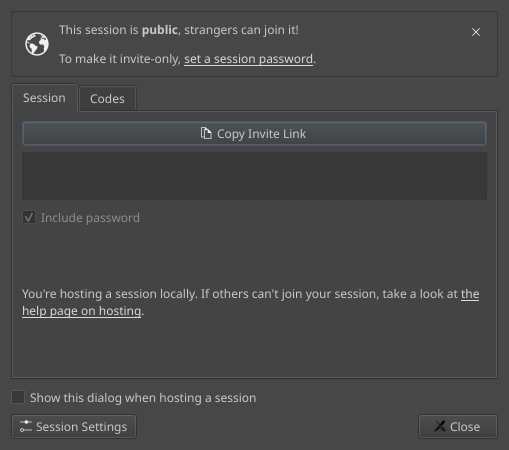
The invite dialog will now show a notice that you’re hosting a public session. If you’re an operator, you also get a prompt to set a password. So if you somehow hosted a public session on accident, you now have a way to immediately fix the situation instead of only noticing when strangers start streaming in. The dialog also now has a button that takes you to the session settings, since it’s a somewhat common place to want to go after starting a session to do more setup.
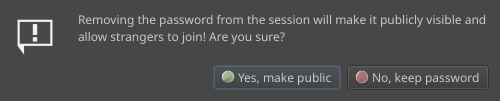
When you change the session password in the session settings and just hit OK with no password entered, you now get a warning that this will make your session public. This gives you a chance to back out if you didn’t actually mean it.
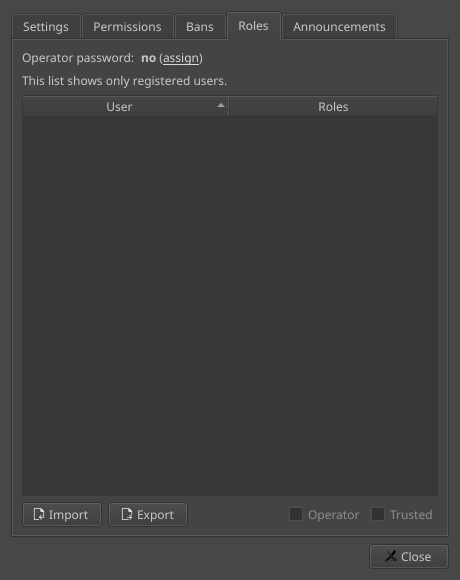
Lastly, the operator password setting in the session settings has been moved to the roles tab, like it is in the host dialog as well. There’s been several cases where people confused the two password options in a stressful situation and accidentally set an operator password instead of the session password, which obviously did nothing to stem the flow of strangers joining.
Obviously all of this doesn’t stop people from intentionally hosting a public session and just kicking everyone except their friends when they join, but that’s hopefully rare. It would be possible to detect that kind of case and automatically set a password on the session, but that would inevitably be prone to false positives.
Thanks Bluestrings, Hyper, tiar and watt for discussions and ideas here.
Block New Joins Removal
The “closed” flag has been removed from sessions. In the client, this was called “block new joins”. What this feature did was to prevent anyone else from joining… which you can achieve just by setting or changing the session password.
The way this feature gets used is basically just a bootleg password anyway. People host a public session, let their friends join, then block new joins. If a stranger joins, they get kicked and may report the session, which is annoying for server admins. If someone gets disconnected, the setting has to be changed again because they won’t be able to rejoin. If everyone is away, they have to annoy server admins. And after everyone leaves, the session becomes public again, which may unexpectedly expose their pseudo-private session to everyone until it expires.
Setting a password has none of these downsides, you don’t need to constantly set and unset it, you don’t get locked out from rejoining and your session doesn’t become public after everyone leaves. And even if you for some reason really want your friends to join without a password, you can still unset and then reset the password, so you can still run sessions in this weird way. If you want to lock people out after they leave, you can just change the password.
So as far as I can see, removing this feature doesn’t remove anything useful, it just gets rid of a feature that annoys server admins. Newer clients will simply not show this checkbox if the server indicates that it doesn’t support it. Older clients will get an alert that the server doesn’t support it and to set or change the password instead.
Minor Additions and Bugfixes
On Android with Huawei styluses, a double-tap gesture is now translated to the F25 key. This was reported by noalero on the Krita Artists forum and has also made it’s way into Krita.
Using anti-overflow with a non-zero expand value set will no longer have a chance of crashing when drawing at the edge of the canvas. This was reported by Ausjamcian.
The simplified brush preview now shows the highlight color for brush that smudge (blue in the default theme) and a checkerboard for erasers. This was suggested by Blozzom and issues reported by xxxx.
The files preferences where you can toggle the debug log now has a button to let you clear all log files. This is particularly useful on Android where you can’t delete them manually, although it’s pretty unlikely that some text files are going to be using a measurable amount of space.
Changing the timeline range on one side of a timeline that has no range set will now properly set both ends. Previously it only set one and extended the frame count until you changed the other side as well. This was reported by dAVePAGE.
When loading an ORA file without timeline information, the timeline now properly loads with a range in it, rather than just being confined to 1 to 24 frames.