Dev Update: Week 8 and 9 of 2026
March 1, 2026
The last two weeks have had several improvements with brush previews, some smaller features and several bugfixes. You can try it out in the alpha release.
Brush Preview Options

There’s now different options for the brush preview in the brush settings dock. You can toggle showing the thumbnail and a title, as well as choosing between a plain and the full preview. You can also disable the preview altogether. These options are in the top-left menu of the brush settings dock.
The default is now the plain preview, since I think the full preview with its checkerboard and many colors is a pretty annoying thing to have in the corner of your vision. The plain preview is significantly calmer and still shows the most useful aspects of a brush.
I’m still not fully happy with this preview, since it fails to represent some important aspects, in particular erasers and smudge brushes. Erasers could maybe be shown via a checkerboard pattern, with some trickiness with regards to partial erasers that MyPaint brushes can be. But for the smudge brushes I don’t have any ideas for how to represent it without making the preview look noisy again or popping up extra elements that cause confusion by being present. This was a past problem of the preview, where it changed a lot depending on which settings you toggled and users just got distracted by the background changing instead of actually seeing what modifying a setting does. If you have ideas on this, let me know.
Brush Stroke Previews

In a similar vein, the brushes dock now gives different display options: thumbnails, strokes or both. The default is now both, since I think seeing the name of the brush and what the strokes look like is worth the trade-off of it taking extra space. The style of the stroke previews is always plain, since the full preview would not only be garish, but also very slow.
The thumbnails display option also spreads the thumbnails out across the available horizontal space instead of pressing them against the left side and leaving a gap on the right.
You can also adjust the size and amount of columns of the previews. These options are available in the top-left menu of the brushes dock.
Curve Inputs
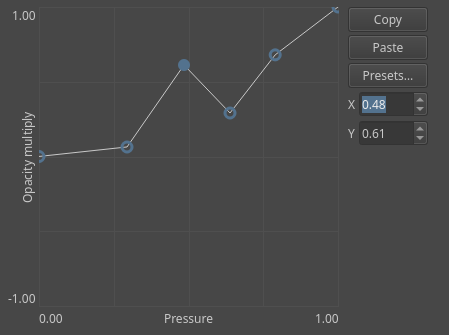
Curves for brush inputs and similar now have input fields that show you the X and Y values of the currently selected point. You can type into them to reach precise values.
FFmpeg Exports
The animation and timelapse exports now allow you to use FFmpeg to export to some additional formats that aren’t included with Drawpile for space or legal reasons. FFmpeg is a video encoder that you can get separately, on Linux you’ll often already have it installed because a lot of stuff uses it.
In particular, MP4 video with the H.264 codec is very useful, since it is fast to encode and very compatible, but can’t be included in Drawpile because of legal issues in some countries. There’s also AV1 and APNG, which are useful in rare cases, but not worth shipping with Drawpile and increasing the amount of dependencies and the size of the program for.
This is not available on Android or the browser, since those can’t run an external programs.
Minor Additions and Bugfixes
The timelapse export should now handle canvas resizes properly and put the correct color on the outside when the video aspect ratio is different from that of the current frame.
The clipping and alpha lock controls on layers are now properly enabled when switching from a non-editable to an editable layer. This was reported by xxxx.
The alpha inherit icon now properly changes color when switching themes. This was also reported by xxxx.
Brushes with out-of-range inputs no longer get clamped by the mere act of opening the brush editor. This was reported by Phoneme.
Repeated frames are now repeated instead of held when exporting videos for timelapses and animations. This is a little slower, but avoids videos getting cut short at the beginning or end by misbehaving players or video processing on art sharing sites.
Brush thumbnails are now only actually decoded when they need to be displayed. This should speed up startup if you have a lot of brushes.
On Android, additional stylus or mouse buttons beyond left, right and middle are now handled properly. This makes e.g. the Wacom MovinkPad’s stylus work correctly, whereas before two of its three stylus buttons got interpreted as a middle click. Mouse button 5 is now bound to toggle the eraser by default. This will also be coming to Krita. Thanks Halla for reporting.
The brush outline for MyPaint brushes now uses a consistent size when switching tools. It could end up with a different size in some cases that would then jump to a different one as soon as you changed the brush size.
MyPaing brushes are now properly marked as modified when you change inputs beyond the first one.
The animation flipbook no longer limits the playback frame range to 99 when opening it.
Color selection in the annotation tool is now asynchronous so that it doesn’t crash in the browser. The web client has been patched to include this. This was reported by Curiosity on GitHub.