Dev Update: Week 52 of 2025 and 1 of 2026
January 4, 2026
The last two weeks have been spent for the most part on getting autosaving to a usable state. It is integrated into the alpha release now.
Autosaving
A bunch has already been written in the last development blog, so I won’t reiterate all of that here. Here’s just what’s in the alpha release as of the time of this blog post.
The previous autosave mechanism, which periodically saved to the previous file you saved to if you enabled it, has been removed. It has been replaced with an “auto-recording” system. Instead of periodically saving, records everything that happens immediately. This should usually let you recover up to the very last brush stroke and is generally pretty light on performance.
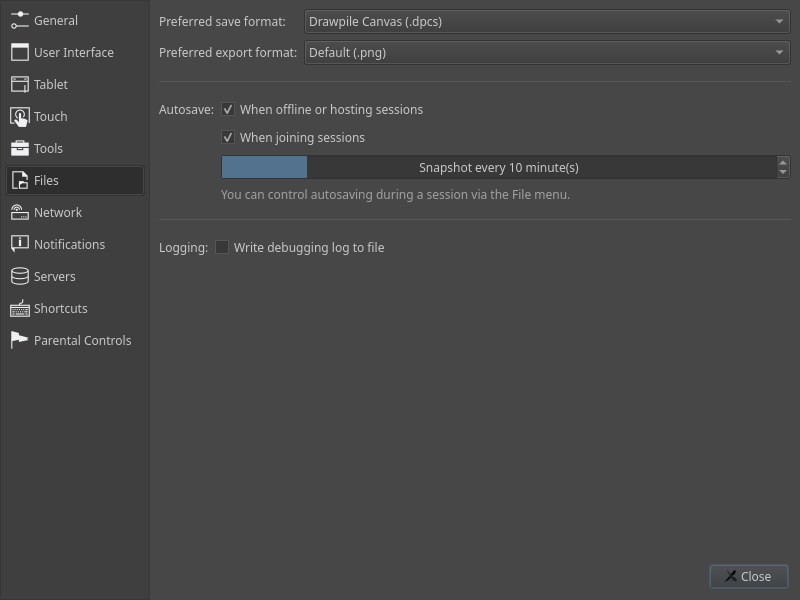
Currently, that is also not enabled by default, mostly because there isn’t any limiters set in place. Like, if you have a session running in the background for a week, that could make your autosave file get pretty huge. You can enable auto-recording globally through Edit → Preferences → Files, where you can toggle it separately for hosted/offline and joined sessions. As before, you can also enable and disable autosaving for an individual session via File → Autosave.
You can also change the interval in which Drawpile takes snapshots of your canvas in the preferences. That setting is mostly there so that people don’t ask about it. Snapshots basically just make recovering an autosave file faster, since it can start from there instead of having to play everything back from a blank canvas. The default value of 10 minutes should be fine for most cases, playing back 10 minutes of drawing should take less than a minute even on slower devices.
There’s a recovery page available in the start dialog where you can recover and delete autosaves. Those will save as dppr (“Drawpile project”) files. The only thing you can currently do with them is to open them to recover an autosave, it’s not yet possible to save them, as is getting timelapses or drawing times out of them.
Autosave files are automatically deleted when you close Drawpile normally. If you want to keep an autosave file for testing, you can abnormally terminate Drawpile, e.g. with kill on Linux, ending the process through Task Manager on Windows or force stopping the application on Android.
Testing, feedback and suggestions are appreciated.
Minor Additions and Bugfixes
Three- and four-finger taps should now work on Xiaomi Android devices. Their operating system has a bug where it cancels those inputs even when you disable those gestures on the system level, Drawpile now ignores the cancellation. This fix has also been ported to Krita.
Stylus buttons on Wacom tablets on Android should now work correctly. Previously they only input a button press when you simultaneously pressed a button on the stylus and put the tip onto the canvas, with the buttons sometimes getting stuck in a pressed state altogether. Now they properly actuate when you press them. This fix has also been ported to Krita.
Drawpile no longer tries to detect whether you have a stylus attached on Android based on what the device says, since at minimum Xiaomi devices just lie about it and always say that a stylus is attached. Instead it now only considers a stylus to be present when it actually sees a stylus input at any point. If you don’t want this auto-detection, you can explicitly pick whether you want touch drawing or not under Edit → Preferences → Touch, just like before. Along with that, the “Guess” option has been changed to say “Automatic (Draw)” or “Automatic (Pan canvas)”, since that makes it clearer what’s going on.