Dev Update: Week 50 and 51 of 2025
December 21, 2025
The last two weeks have mostly been spent on swapping out the settings integration and getting autosaving running.
Settings Swappage
While it still uses the same underlying implementation, the settings interface in the entire application has been swapped out.
The previous interface was based on Qt’s QSettings and had a very nice C++ interface. Unfortunately, like using C++ intensely often does, this has caused problems with the Microsoft C++ compiler in the past, as well as driving up the time it takes to build Drawpile.
The new interface is elegant, using macros instead of C++ templates to bind settings to controls and such. However, this speeds up building the project by about 10%, which is a pretty huge chunk.
The code for the interface is now generated in advance from a definition file, rather than at compile-time, and is able to use different implementations under the hood. Currently it only supports in-memory settings and delegating to the previous implementation, but presumably that’ll be switched to SQLite in the future.
On the surface, there should be no difference. There may be bugs though, since this switch touched a lot of parts of the application.
Autosaving
The work on automatic saving (or really, automatic recording) has been progressing. A good chunk of it is functional now and it might be possible to get that into a state that’s already useful in the coming days (depending on holiday spirit), but another chunk is still missing.
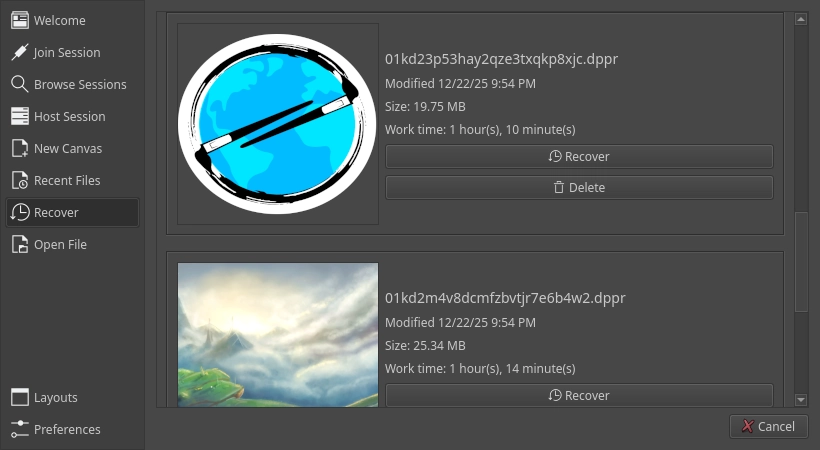
The actual saving part works. That is, when a new canvas is created, a file is opened or a session is joined, Drawpile automatically saves a snapshot and starts recording everything you do to a project file. If you exit Drawpile cleanly, that file is deleted. If not, it is retained and will show up on the start dialog in the new Recovery tab.
Unlike most other program, this autosave mechanism is continuous. That is, it doesn’t save a snapshot of your current state every few minutes, it instead records every drawing command as it happens. The only thing that is periodic is the generation of a thumbnail for the recovery dialog. It probably would also make sense to take a periodic snapshot to make recovery quicker instead of having to do it from the beginning, but that’s not currently done.
That means you can’t just restore the latest state of a canvas, but also every state leading up to it. You could even theoretically edit the recording, for example to fix the old “lined on the sketch layer” situation, if we can figure out a UI for it. It’s also possible to create a timelapse from it and to query how long you’ve spent actively drawing a picture by looking at the timestamps of the recorded commands.
There’s currently two settings to enable autosaving when offline and to enable it when joining a session. When you host a session, it starts out offline, so there’s no separate setting for this, the offline recording simply continues. You can also toggle autosaving on the fly through the File menu.
There probably need to be more settings for this, such as size thresholds. You wouldn’t want a runaway session to eat up all storage after all. It may also make sense to give the option to enable or disable autosaving in the login dialog so that you can decide whether you want it when joining a session. It may also make sense to give the option to manually or automatically truncate recordings for when you don’t care about restoring past states, making timelapses or querying your work time.
I’ve also been thinking that it could make sense to keep autosave files around a little longer, rather than instantly obliterating them when you exit. Of course it would need to be configurable how much space you want to spend on this, but the files are generally pretty small, so even 512 MB would usually let you store a good number of them as a safety net. That way, even if you accidentally press “discard” on the wrong window, you’ll be able to get your pictures back.
Further ideas on this are appreciated, there’s quite a lot of possibilities to this feature.