Jekyll2024-10-14T00:45:12+00:00https://docs.drawpile.net/feed.xmlDrawpileCollaborative DrawingDev Update: Week 40 and 41 of 20242024-10-13T22:00:00+00:002024-10-13T22:00:00+00:00https://docs.drawpile.net/devblog/2024/10/13/dev-updateThe last two weeks have mostly been spent on reworking the shortcuts system to let you assign shortcuts to brushes and making the settings for them more usable with regards to finding shortcuts and resolving conflicts.
Shortcuttage
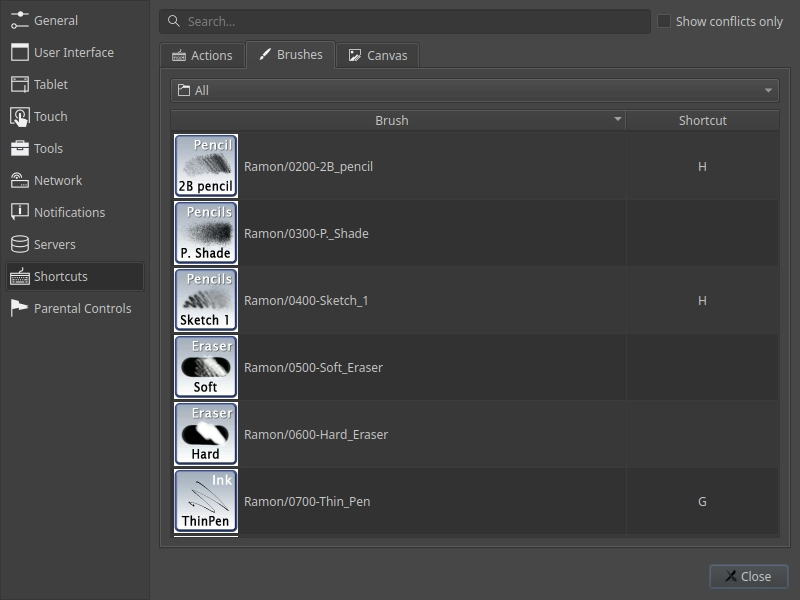
You can now assign keyboard shortcuts to brushes directly. Assigning the same shortcut to multiple brushes will toggle through those brushes in alphabetic order. The shrotcut is also shown when editing a brush.
All shortcuts are now in the same settings tab, rather than spread across multiple of them. Searching will search across all of them and conflicts are shown between them as well. You can also filter shortcuts by conflicts only, to help resolve those better.
Parts of this were suggested by annoy and MajorCooke.
F-Droid Submission
Drawpile has been submitted to F-Droid, a store application available for Android that serves free and open source software. It hasn’t been accepted in yet, but it’s just waiting for their review at this point. Installing Drawpile through F-Droid would be a bit easier than manually doing so via the APK and it would get you automatic updates.
You can track this GitHub issue if you want to follow it, suggested by danmou.
Minor Additions and Bugfixes
Double-clicks when toggling layer visibility and check state no longer get ignored. This was reported by Chryssabliss.
MyPaint brushes no longer sometimes ignore the first stroke made with them. This could also occasionally lead to the preview ending up blank.
You can now choose between a round and square expansion shape for flood fills, the magic wand and when altering a selection. The square shape is particularly useful for pixel art. This was suggested by BigCheese on Discord and MorrowShore on GitHub.
]]>Dev Update: Week 38 and 39 of 20242024-09-28T22:00:00+00:002024-09-28T22:00:00+00:00https://docs.drawpile.net/devblog/2024/09/28/dev-updateThe last two weeks have been spent with some new hardware in the form of a Surface tablet, which allowed several fixes and additions in regards to UI scaling and touch features.
Color Picker Sampling Circle
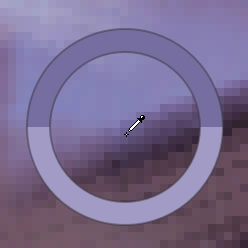
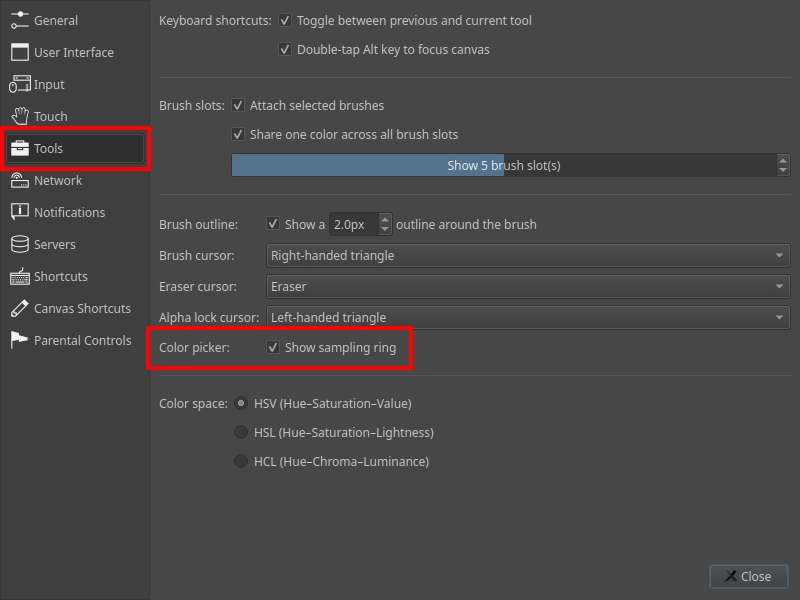
The color picker now shows the picked color in a preview on the canvas.
You can toggle this under Edit → Preferences, under the Tool tab.
Rotation Snapping
Canvas rotation now snaps automatically around 0° when using the canvas shortcut or touch to rotate the canvas. This makes it easier to reset the rotation without having to use a separate shortcut, with a small enough range that you don’t lose any rotation angles that are actually useful.
If you don’t like this, you can change the canvas or touch shortcut to “free rotate canvas” instead, which will disable this behavior.
Touch Gestures
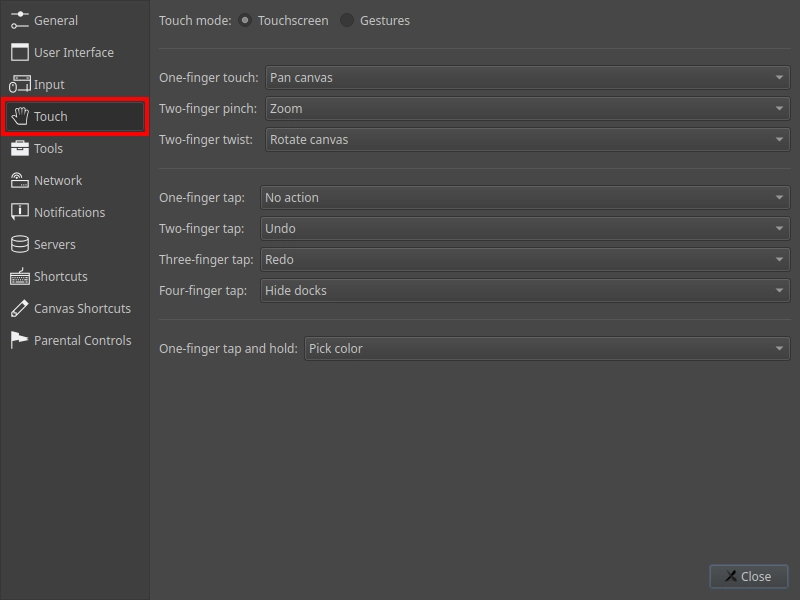
Drawpile now supports more kinds of touch gestures. They have been moved to their own tab in the preferences, where you can pick the behaviors.
By default, you can tap the canvas with two fingers to undo and with three fingers to redo. Tapping it with four fingers will hide and show the docks around the canvas. Tapping and holding one finger in place will summon the color picker, indicated by the color sampling circle around the touched spot.
Minor Additions and Bugfixes
The browser and Android will now guess whether to enable touch drawing by if it received a pen event. That means if you have a phone or tablet without a pen, touch drawing will be enabled, if you do have a pen, just moving it over the canvas will disable it. This was suggested by TomTheDragon in person.
Several issues with UI scaling have been fixed, relating to dock toggling, brush outline scaling and others. This was reported by annoy in person.
The layer view mode will now render the active layer truly in isolation, disregarding the parent opacity, visibilities and blend modes. This was reported by MachKerman on Discord and incoheart on GitHub.
There is also now a group view mode that will show the parent group of the active layer. This was suggested by Rylan on Discord.
The server API now has endpoints for checking session and user passwords, allowing external tools to check those.
]]>Dev Update: Week 36 and 37 of 20242024-09-13T22:00:00+00:002024-09-13T22:00:00+00:00https://docs.drawpile.net/devblog/2024/09/13/dev-updateIn the last two weeks, most development work has gone into expanding on brush slots and presets. A few other fixes and features also made it in there along the way.
Brush Attachment
Brushes now get attached to the slot you put them into, making their thumbnail show up next to the stroke preview. When you modify the brush, these changes are now automatically remembered in the brush, as indicated by the pen icon in the top-left corner. When you switch to a different brush and back, it will reload that changed state. Reverting the brush to its original state is now done explicitly, using the revert button in the top-left of the brush dock. Attaching the same brush to two different slots still works, they won’t overwrite each other.
The brush editor now also lets you modify the thumbnail, name and description of the brush, rather than having those be in a separate dialog. You can save your changes into a new brush or overwrite the existing one from there.
This is how Krita and most other drawing programs handle this type of thing, so it should make it easier to switch between those and Drawpile. If you prefer the old setup, you can either disable attached brushes in the tool preferences altogether or detach individual slots using the menu at the top-left of the brush settings dock.
Playing Slots
The number of brush slots is now configurable in the tool preferences. The default is still 5, but you can go up to 9 brush slots. The eraser slot is everpresent.
When you set the slot count to 1, the slot will show a brush icon instead of a number, making it look a bit nicer.
The server now provides more information about the reset state of sessions in the admin interface to help in debugging potential issues with streamed resets (you can read more about that in the last devblog entry.)
Huion tablets should no longer randomly draw full-pressure strokes. This was due to them emitting spurious mouse clicks, which Drawpile now ignores. This was reported by Blozzom, DT and and Dumb Dog Disease on Discord.
The brush import now supports old (version 1 and 2) MyPaint brush packages. If you were getting an error about a brush pack not containing valid JSON, those should now import correctly. This was suggested by bunnie on Discord.
There’s now a Toggle Layer Visibility action available in the Layer menu. The primary point of this is so that you can assign a keyboard shortcut to it. This was suggested by incoheart on GitHub.
MyPaint brushes now remember the input and output ranges you had configured in the brush editor, rather than reverting to whatever fits the curve. This was suggested by Verdrusk directly.
]]>Dev Update: Week 34 and 35 of 20242024-08-30T22:00:00+00:002024-08-30T22:00:00+00:00https://docs.drawpile.net/devblog/2024/08/30/dev-updateThe last two weeks have mostly been spent on implementing streamed autoresets. This feature should get rid of those disruptive session resets by instead performing them in the background.
Streamed Autoresets
Session autoresets is something that most people using Drawpile have seen: everything stops, a message in the chat appears that says “preparing for session autoreset” or similar. Then there’s a pause where you can’t draw, a bar fills up and, after a bit, session looks the same as it was. Usually.
This happens for technical reasons. There’s already an article on that explaining these resets in more detail. But in short: the way this works is annoying and inefficient, since it’s a whole lot of work just to end up with the canvas looking like it did before.
Streamed autoresets fix this. Instead of pausing the session, they just happen on the fly. Only the client doing the autoreset actually sees that it’s happening because they’ll get a message in the bottom-right corner telling them that they’re compressing the canvas and then uploading it. Everyone else just sees that the session size in the bottom-left corner goes down at some point, but there’s no interruption and everyone can just keep drawing during it.
The upside for clients is obvious: no annoying interruptions. But it’s also better on the server-side, resets are a pretty expensive operation that use a lot of memory and require sending the entire session state to every connected client. Streamed autoresets can go straight into a file instead and don’t require clients to be re-sent the state they already got.
Downside is that is uses slightly more disk space on the server, which is fine. And of course there’s a potential for desync to go unnoticed if there’s a bug somewhere… but that’s probably preferable to session resets immediately chewing up the session and requiring that annoying banner at the top asking you if you want to save the previous state.
Note that this only refers to auto-resets. Manual resets via Session → Reset still work like they did before, since their whole point is to throw away whatever the server’s state is and replace it with something you give to it.
Compatibility
Streamed autoresets need the server to be updated to support it. At the time of writing, none of the official community servers have been updated to it, since the feature is still a bit too new for that and needs some smaller-scale testing first.
On the client-side, it’s fully compatible. If there’s an operator in the session that’s on a client supporting streamed autoresets, they will happen. If no operator has a client that supports it, you’ll get the old behavior.
Explanation
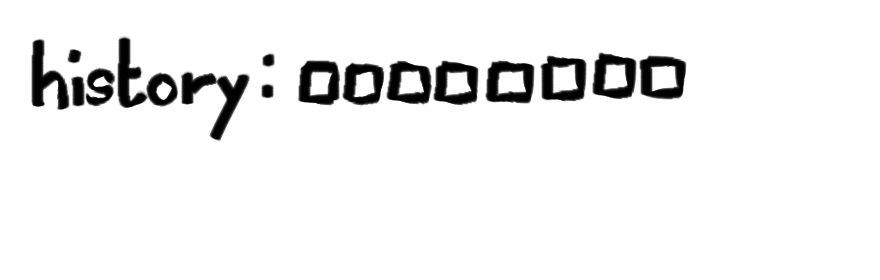
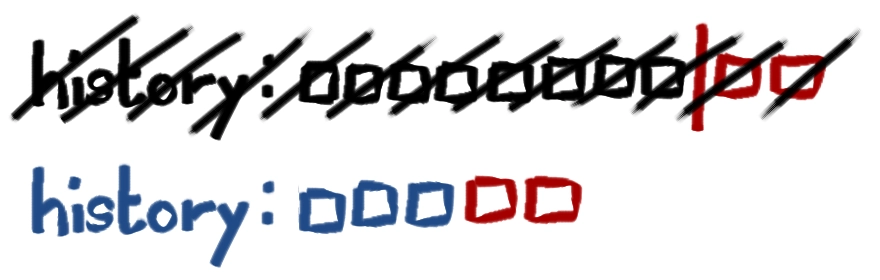
This is a simplified explanation to show how streamed session resets work. It begins with the history, which contains a list of drawing commands, illustrated here as rectangles going from left to right. When somebody joins, they receive all these commands and once they caught up they see the canvas as it should be.
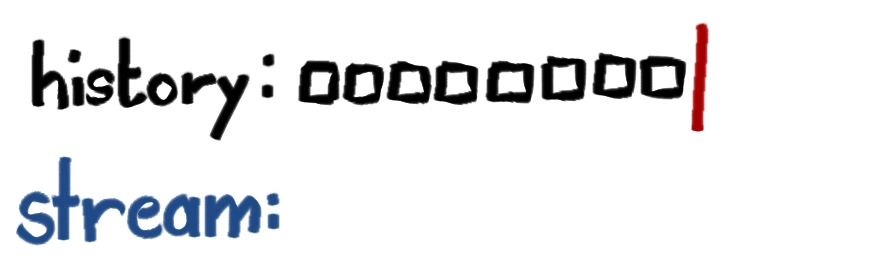
Now we start a streamed autoreset. This marks the point in the history where the stream begins and a new list of drawing commands is started. This list will contain a compressed set of commands that contain the current canvas as an image instead of a bunch of commands.
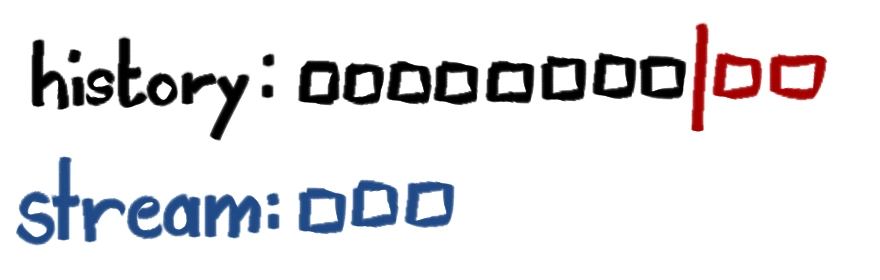
This stream list gets built up in the background, but people can keep drawing and those drawing commands are added to the history, just like they would be without the stream.
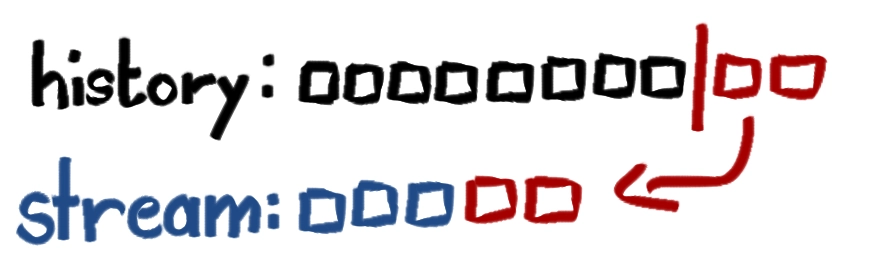
Once the stream is done, the commands that happened since it started are added to the end…
…and then the stream becomes the new history, with the previous history being discarded. When someone new joins, they will catch up to this new, shorter history instead. Since the starting point was synced up with the old history, they should get the same canvas as everyone that’s already in the session.
More Techy Explanation
This explanation goes in detail of how streamed reset process works. You can skip this part if you don’t want all those nits and grits on you.
If there’s an error anywhere in this process, the stream is discarded if it was open and the autoreset is retried. Errors include stuff like getting no response to an autoreset query, the session running out of space, a write error occurring, the resetting client leaving or them losing their operator status.
If a regular reset comes in during the stream, it is also discarded and the regular reset is processed instead.
1. Autoreset Query
When the autoreset threshold on the session history is reached, the server sends out an autoreset query to all operators in the session. The query contains a unique correlator for this autoreset request. It then sets a 3 minute timeout and waits for responses.
Clients will respond to this query if they consider themselves caught up enough. Old clients will ignore the correlator and just send a blank ready response. New clients will send along an indicator of their capability to perform a streamed autoreset, their operating system (something like “windows” or “android”, no versions or anything), their network quality (currently 0 if the client set their connection quality to “poor” in the network settings, 100 otherwise) and their last 64 latency measurements.
The server will collect this information into a list of candidates. Once the first response comes in, a 3 second timeout is started to give other clients the chance to also respond, but not delay the autoreset unnecessarily.
Once all responses have come in or any timeout is fired, the server moves to the next step.
2. Autoreset Start
The server now picks the best candidate, which is determined by the following ranked sorting:
Clients that can do streamed autoresets are better than ones that don’t.
Clients on desktop operating systems are better than Android or the browser, since the latter are stingy on memory and tend to fall asleep when the application or tab is put into the background. Unknown operating systems are in the middle.
Clients with higher network quality are better than ones with lower quality. No network quality is treated as zero.
Clients with a lower average ping are better than ones with higher average ping. If no average ping is provided, this comparison is skipped for those clients.
Clients that respond first are better than ones that respond later.
The sorting happens in this order, meaning that a user that supports streamed autoresets is preferred over any other user that doesn’t, no matter their operating system, network quality or latency. If two users support streamed autoresets, the one with the better operating system wins, otherwise the one with the higher network quality and so on.
Once a candidate is determined, they are sent an autoreset request message. This message will contain the correlator again if it’s a streamed reset, which is the case we’re following here. Otherwise, it’s an interrupting reset that behaves as it did before.
3. Stream Start
The client receives the autoreset request and remembers the correlator in it. Then it sends a stream-reset-start message to the server.
The server will open a reset stream. For an in-memory history, they just go into a vector. For a file-backed history, a new recording file is opened and a new cache block is started at this point. A soft reset message along with a stream reset start response message are added to the history.
The client will receive these messages and send itself an internal stream reset start message, which will be processed by the paint engine right after the soft reset. The client will then start generating a reset image from the canvas state. This reset image consists of messages of the new type reset stream. These messages form a chunked gzip stream which decompresses into the actual messages making up the reset image.
4. Stream Progress
Once the client has the reset image ready, they send the first message of it to the server. The server receives the message, decompresses it and adds the resulting messages to the stream. It then sends an acknowledgement to the client, which will prompt it to send the next message. This rigmarole with acknowledgements avoids the client saturating their upstream and being unable to draw properly.
If something goes wrong, like the server being unable to decompress or write a message, it sends a negative acknowledgement to make the client stop sending messages.
5. Stream Preparation
Once the client is done sending all its messages, it sends a stream-reset-finish message to the server, at which point its duty is done.
The server finishes off any remaining decompression and puts the stream into a pending state. This state will usually resolve immediately, but if there’s currently a client catching up and reading messages from the pre-stream area of the history, it will be delayed until that’s completed.
6. Stream Resolution
Once all clients are caught up sufficiently, the server appends the messages that have arrived to the history since the stream was started to the end of the stream. It then throws away the history and replaces it with the contents of the stream. For in-memory sessions, this just means swapping vectors. For file-backed sessions, it involves closing and deleting or archiving the previous recording, writing the new recording file to the journal and updating the cache blocks to the new recording.
The session size and autoreset thresholds are updated, a settings update is appended to the history and session size update is sent to all clients. Then the streamed reset is done.
Color Dockage
There’s been some changes to the color sliders, wheel and palette. All of them have a menu button at the top-left now.
The color sliders can now be configured to show all sliders at once instead of requiring you to toggle them. You can also toggle the presence of the hex input, in case that takes up too much room to fit on your layout. You can also change the color space here now, rather than having to go through the preferences for it.
For the color wheel, the settings that used to be in the tool preferences are also in the menu now. You can change the shape, rotation, direction and color space here now.
There’s also now an option to change the alignment of the wheel, you can make it aligned to the top if that looks better in your layout. The default continues to be in the middle.
And the wheel will now preview your color while you’re picking it. The top part of the color is what you’re currently picking, the bottom part is the previous color for comparison, which is useful if you’re trying to find the right values or contrasts when painting something. This preview can be turned off in the menu as well.
For the palette, the menu button is the only change. It got moved from being next to the palette drop-down to being at the top-left of the dock, to be consistent with all other color docks.
Various parts of this were suggested by MachKerman and MorrowShore on Discord.
Minor Additions and Bugfixes
Soft brushes are now centered on the cursor better, they got offset by an earlier fix. This was reported by Meiren on Discord.
Gridmap settings in MyPaint brushes no longer get messed up when first opening the brush settings editor. This was reported by Blozzom on Discord.
Some default shortcuts were added. The numpad enter key now applies an action just like the regular enter key does, but you can still assign them separately (left-handed people tend to have a lot of shortcuts on the numpad.) Ctrl+Equals now zooms in just like Ctrl+Plus does, since either one makes sense depending on your keyboard layout. These were reported by MachKerman and Sinamer on Discord.
The flood fill will no longer consider its own preview when using the merged image as the source. This was reported by Meru on Discord.
]]>Dev Update: Week 32 and 33 of 20242024-08-17T22:00:00+00:002024-08-17T22:00:00+00:00https://docs.drawpile.net/devblog/2024/08/17/dev-updateDrawpile 2.2.2-beta.3 has been released now. You can read more about that in the release announcement on drawpile.net. Since then, there’s been much testing and some smaller additions.
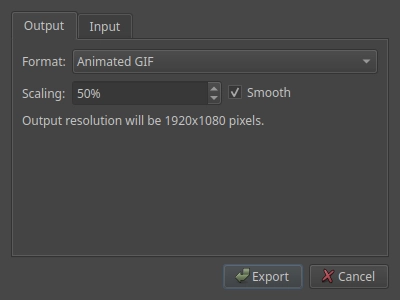
The animation export dialog can now scale the video, animated image or image series to a different size, either smoothly or with nearest-neighbor interpolation. You can use this, for example, to scale down large canvases to a size that doesn’t make phones explode trying to view them in full resolution or scale up pixel animations to a size that’s easier to view.
This was sort of reported by Hopfel, who animated across an entire 8K canvas.
Proxy Handling
Drawpile will now automatically ignore system proxies that can’t actually be used to proxy its connections. This can happen if you have some kind of HTTP proxy set up on your system for example, which Qt will pick up on, but then fail any non-HTTP connections with it. Now it disables them if they would cause these kinds of errors.
To go along with this, you can also now manually disable any system proxy in the network preferences. The system info dialog under Tools → Developer Tools → System Information will also now show information about the system proxy configuration as Drawpile sees it.
Additionally, the error messages for failed connections have been made more detailed. They now tell you the internal error code and, if a proxy caused the connection to fail, will inform you about how to disable it.
The margins on selections’ marching ants outline and selection masks are now calculated correctly according to the current zoom level. Previously, they could cause rendering glitches on some systems. This was reported by xxxx directly.
]]>New Stuff in the 2.2.2 Beta and What’s Beyond2024-08-09T16:40:00+00:002024-08-09T16:40:00+00:00https://docs.drawpile.net/devblog/2024/08/09/betaThe first Drawpile 2.2.2 has been released. You can download it from the downloads section on drawpile.net.
Selections have been completely rewritten. They are now persistent, so you can make a selection and then add to,a remove from and intersect with it. Deselecting is done explicitly, for example by double-clicking outside of the selection.
You can invert, grow, shrink and feather selections through the menu at the top. If you want to select everything on a layer, there’s the option to select layer bounds. You can also turn the contents of a layer into a selection, for example if you want to expand and fill it to give it a sticker-like outline or similar.
Improved Transforms
Transforms are now separate from selections. To start transforming, you can click on your selection and it will switch over to a transform. There you can scale, rotate, shear and distort freely. To apply it, you can either double-click outside of the transform or hit Enter. Also, clicking outside of the transform once now no longer applies it instantly, so no more accidentally missing an arrow and having to redo the entire transform over again.
Also, you can finally transform multiple layers at once now. For example, when you have a layer group selected, you can move the contents of the entire group. To change which layers are affected, you can toggle the checkboxes that show up in the layer list when you’re transforming.
Another bit of improvement: when you transform a selection that is too large and would get cancelled to avoid chugging, Drawpile now automatically turns it into a cut-and-paste operation instead.
Extended Fill Tool
The fill tool now doesn’t immediately fill after you click, it instead previews your fill locally and asks you for confirmation. That means you won’t “flashbang” other people even when you’re using a large size limit and, if you have a slow connection, won’t have to wait for your undo to go through.
You can also change your fill while it’s being previewed. Set the color to something else, adjust the opacity or modify the tolerance without having to redo the fill. You can also change the layer your fill is on.
On top of that, there’s now more settings available: shrinking in addition to expanding the fill, filling all similar colors or the entire selection instead of just connected areas, opacity control and letting you use all blend modes instead of just a handful.
New Magic Wand Tool
The magic wand tool is basically a fill tool for selections. It works pretty much identically, with most of the same controls. It also asks for confirmation after “filling”, so you can make the same kind of adjustments without having to click again. Just as with the other selection tools, it can add to, remove from and intersect with the existing selection.
More Animation Imports and Exports

You can now import animations from a set of frames, as well as from layers in an ORA or PSD file. These are available from the File → Import menu.

Exporting animations is also more comprehensive now, letting you export as MP4 or WEBM video and animated WEBP images. You can also export frames in a ZIP folder now, which means you can use those in the browser and on Android now, where exporting PNG frames as separate files isn’t possible.
And More
There’s of course other stuff, like rulers, new canvas renderers, a pan tool, better tablet handling, WEBP support and more. If you’re interested in going back and looking at what’s been going on, you can peruse the development blog, which has regular updates on what’s been worked on.
What’s Coming
There’s some things that’s planned to be implemented until the final version of Drawpile 2.2.2.
Selections still could use some additional work. For example, having a mesh transform or a pivot point would be nice. The way that selection masks look may also yet change from the current look.
The host and session settings dialog are supposed to get an overhaul. They’ve kind of grown over time, making them pretty clunky and difficult to use. They need to be consolidated so that you can just set up sessions without needing so much clicking and fiddling.
The fill and magic wand tools could get optimized a bit better in unlimited mode and their gap detection improved by taking code from Krita.
And there’s some ideas on how to improve Drawpile for new users and those who are normally used to other drawing programs. This has a few different aspects, like keyboard shortcut presets with different program defaults, a tablet setup dialog that helps fiddle with the different driver, touch and stabilization stuff, as well as making the brush slot system optional and instead allowing you to only use presets instead, similar to how most other programs do it.
What’s Beyond
One thing that’s notably missing about selections is of course the ability to use them to mask your brush strokes. This can’t happen in 2.2.x because it would break compatibility with older 2.2 clients that don’t understand that kind of masking, so this is planned to come in Drawpile 2.3.0. What would also be cool is to add an automatic “stay inside the lines” masking mode, which the selection system already has some provisions for supporting.
There’s some plans to rework the animation system to allow for easier collaboration with multiple animations on the same canvas and remove the fiddling required to switch between animation and regular mode, as well as adding support for cel-style animation tracks. You can read some more thoughts on that in this article on animation plans.
We also have some ideas on how we could make session resets less disruptive. There’s also an article on that.
Adding facilities for automatic recording and recovery in Drawpile is also major point of improvement. We have a very nice and lightweight recording facility already in place, which we could use to restore not just after a crash, but also travel back in time and restore things that were accidentally deleted in the past. Or even go back and edit the recording to let you fix the old “oops I lined on the sketch layer” issue. It would also allow for adding an easy to use timelapse feature on top of it, which is already implemented as a command-line tool, so it’s basically just waiting to be wired up to something.
And other things! If you’re interested, you can take a look at the issues on GitHub, it should be a reasonably complete list of ideas and problems.
]]>Dev Update: Week 30 and 31 of 20242024-08-03T22:00:00+00:002024-08-03T22:00:00+00:00https://docs.drawpile.net/devblog/2024/08/03/dev-updateThe builds for Drawpile 2.2.2-beta.2 are now available to try out! Still gotta write a release announcement, make a Flatpak build and some other stuff, but you can grab them already.
In fact, you should grab them! If you find any major issues before the announcement is sent out to everyone, you might save someone some trouble or even lost art. So early testing is always appreciated.
Beta Release
Before you grab the release, consider taking a look at how you can enable crash dumps! If you have these enabled and Drawpile crashes, you’ll get a file that you can send to a developer that may let them figure out what went wrong. This only works if you turn it on before Drawpile crashes, otherwise that information will be lost to the aether (or, more likely, sent to Microsoft, who will just ignore it.)
The version is called “beta.2” because there was already a server-only beta.1 shortly after 2.2.1 came out, which contained some stuff to support the browser version of Drawpile on the public servers. So this is the first interesting beta, you didn’t miss anything.
File Formats
It took several days of fighting against Windows to get the libraries needed for additional file format support to work there, but now they’re in there.
You can now export animations as MP4 videos, WEBM videos and animated WEBP images. If in doubt, MP4 is the most compatible of these.
Opening and saving WEBP as still images is also supported now. We’ll probably start using WEBP in Drawpile internally for some stuff, since it’s smaller and faster than compressing images as PNGs, so libwebp is now a mandatory dependency.
Minor Additions and Bugfixes
High-DPI scaling is now enabled by default on all platforms except Android.
If the server supports it, session resets will now no longer pop open the chat and instead show a HUD message about it. Older servers still send them as a regular alert though.
Kinetic scrolling on Android is now done via touch only, not via the pen, since that caused some trouble with stuff like moving layers or operating pressure curves.
You can now import role lists with more than 100 users on them, since that’s something that long-running public sessions need. This was reported by kale on Discord.
The dedicated server now lets you change a session’s founder name to something else via the web admin API.
]]>Dev Update: Week 28 and 29 of 20242024-07-20T22:00:00+00:002024-07-20T22:00:00+00:00https://docs.drawpile.net/devblog/2024/07/20/dev-updateThe last two weeks have been spent on getting the 2.2.2 beta ready. Translations for it are open, if you want to contribute some: https://hosted.weblate.org/engage/drawpile/
Iconography
Some icons have been changed to make them look nicer and clearer. Several buttons in dock headers and footers also fill the available space a bit more now, making them easier to hit.
These were contributed and suggested by MorrowShore.
Color Sliding
The color sliders now show only three sliders at a time instead of six, either HSV/HSL/HCL or RGB, with a toggle between them. This reduces the minimum size by a good chunk, which is nice for smaller resolutions. Editing both of those sets of sliders simultaneously is unlikely to be something you’d be doing normally, so this switch shouldn’t cause significant burden on usability otherwise.
Since there’s some extra room now, there’s a color input field here now, where you can put in and copy out hex colors and similar.
This was suggested by Kawaxte and MorrowShore.
Android Filings
Saving files on Android now first writes them to a temporary storage and then copies them over the existing file, making it less likely that you end up with a corrupted file somehow. It’s still not an atomic operation, since Android doesn’t support that, but a crash or the application getting terminated by the OS for being in the background for too long or something will no longer destroy both the old and new file.
Files are also truncated on write properly now. This could lead to (fixable) corruption on ORA files on Android before.
Minor Additions and Bugfixes
A discontinuity in soft brushes now gets compensated for, which should avoid some cases of jags in tapered strokes. This was reported by BulletPepper on Discord.
Zooming with keyboard shortcuts now zooms where the cursor is pointing instead of onto the center of the view. If you like the old behavior better, there’s separate “center” keybinds for it now. This was suggested by Chryssabliss.
The drawpile-timelapse command-line tool now allows cropping and cuts out pauses.
Typing an annotation or into chat should now no longer switch tools if you press their shortcut key. This was reported by leopardheart982 on GitHub.
]]>Dev Update: Week 26 and 27 of 20242024-07-05T22:00:00+00:002024-07-05T22:00:00+00:00https://docs.drawpile.net/devblog/2024/07/05/dev-updateThe last two weeks have been some more work on filling and selections. I think this may be the point where no new strings are added before the next beta release, so unless something comes to me, translations will open for it soon.
You can now expand, shrink and feather (blur) selections. This can be done via Selection → Expand/Shrink/Feather Selection. This will present you with a dialog where you can pick what to do to your selection in that regard.
Selection operations are now local-only. That means that making large selections won’t slow other people down and connecting to a session won’t pointlessly process stuff during catchup unnecessarily. Since currently selections don’t have any visual effect, this doesn’t cause any kind of desync.
The way this works is by only sending a “local match” message across the network. Other users will ignore this message, since they have nothing to match it to, but the client that sent it will be able to match it with the real command that happened locally and know that it’s synchronized properly.
In the future, pieces of a selection can be sent across the network as needed to implement stuff like brush masking with selections or maybe also a “draw within the lines” mode. Drawpile supports multiple selections per user under the hood of which it currently only uses a single one with ID 1. So it could use ID 2 for brush masking in the future and ID 3 for drawing with in the lines. It can send only the parts of those selections that are actually needed, thereby avoiding slowdowns from huge selections being applied all at once.
Indirect Blend Mode Switchery
Indirect mode in Drawpile is also called “wash” or “opacity” (as opposed to “flow”) in other programs. It keeps the opacity across a stroke consistent.
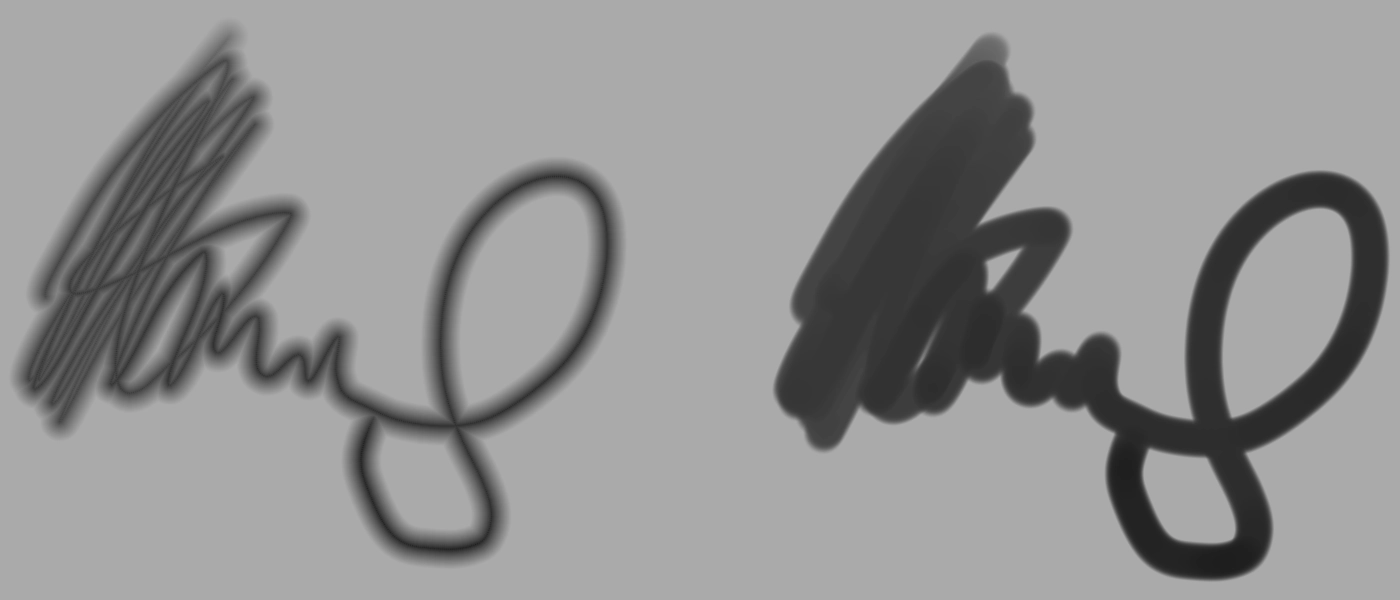
The way Drawpile implements this allows for softer brushes than in e.g. Krita. However, this doesn’t look particularly nice if you want to overlap strokes.
A more Krita-esque blend mode has been implemented now. It doesn’t allow brushes to get as soft as they do with the current way they’re implemented, but avoid most of the artifacting issues. It’ll probably be appearing in Drawpile 2.3.0 as the default option, but won’t be introduced into 2.2 since it would cause desync. We’ll probably keep the old one as an option though, since it’s useful for stuff like soft line brushes, where you don’t overlap them anyway.
In the picture below you can see a comparison of it. Left is the current one, right is the new one.
Minor Additions and Bugfixes
Drawpile’s dependencies have been bumped to the latest versions.
Selections now don’t randomly start in the wrong view mode anymore, they will use the mask view if you enabled that and the marching ants if you didn’t. This was reported by Blozzom on Discord.
The selection outline will no longer be generated if your selection is overly large, since that can run you out of memory. It will instead always use the mask view in that case. This was also reported by Blozzom on Discord.
You can now specify idleOverride and allowWeb in the dedicated server’s session templates, the options were missing from there. This was reported by MorrowShore.
]]>Dev Update: Week 25 of 20242024-06-21T22:00:00+00:002024-06-21T22:00:00+00:00https://docs.drawpile.net/devblog/2024/06/21/dev-updateThis week has been some major reworking of the fill tool and some minor additions to selections and transforms.
The fill tool has received some upgrades. These also apply to the magic wand, where appropriate.
When you make a selection, it now acts as the fill tool boundary, removing the regular size limit. So if you have a weird shape where the rectangular area is inconvenient, you can just make a lasso fill around it instead. The selection also acts as a mask for the fill.
The fill tool now lets you pick any blend mode, rather than just a handful, and an opacity for the fill. These can be changed after making the fill but before applying it.
You can also change layers after making a fill now. So, for example, you can fill on your line layer, then switch to the color layer and then apply it. The option to set a fill source layer is still there, if you prefer doing it that way instead the annoying layer drop-down is gone now and has been replaced with a separate button.
And you can also change the color before applying a fill. The other options, like expand, feather, close gaps etc. can’t be updated in-place - at least not yet. It would be nice to be able to do so, but changing those may be kind of slow, so that’s a bit more complicated to implement.
There’s also a mode in the fill tool to fill the entire selection now. It’s similar to the fill shortcuts in the Edit menu, but with more controls.
More Selecting and Transforming
You can toggle the selection view mode to be a solid mask instead under View → Show Selection Mask. This lets you see the opacity of your selection, whereas the usual marching ants outline doesn’t represent that properly.
Transforms now let you pick the blend mode and opacity. This can be used e.g. to paste a texture and apply it with Recolor. These parameters also apply when you stamp a transform.
Minor Additions and Bugfixes
Some incorrect math in the Behind blend mode has been fixed, it made some things too transparent. This shouldn’t make too much of a visual difference in most cases, but may cause slight desync. This was reported by Blozzom on Discord.
Right-clicking to cancel the fill tool now works even if you have right-click bound to a canvas shortcut. This was reported by SadColor on Discord.
Layer picking now works properly in frame view mode. Previously it picked the bottom-most layer you clicked on, rather than the top-most.